
File Actions
Context Menu Actions
Section titled “Context Menu Actions”Each file in the component has an action menu with the following options:
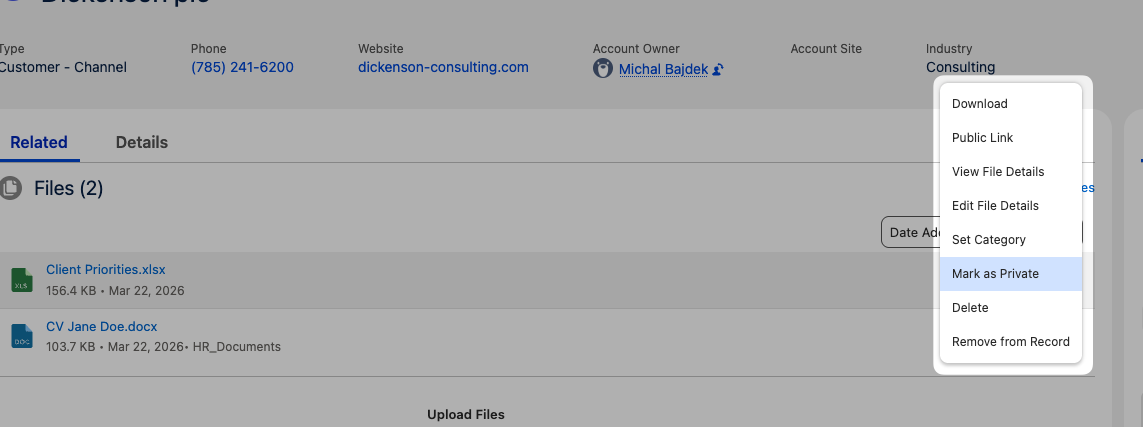
| Action | Description | Availability |
|---|---|---|
| View Details | Opens the standard Salesforce file detail page | All users |
| Edit Details | Edit file name and description inline | Users with edit access |
| Download | Download the individual file | All users |
| Public Link | Generate a public sharing URL for the file | Configurable via component property |
| Delete | Delete the file permanently (with confirmation) | Users with delete access |
| Remove | Remove the file from this record without deleting it | Isolated mode only |
| Set Category | Assign a visibility category to the file | Isolated mode + Manage Categories permission |
| Mark as Private | Make the file visible only to you | Isolated mode only |
| Remove Private | Remove the private flag from the file | Isolated mode, file owner only |
Native File Preview
Section titled “Native File Preview”Clicking a file name opens the standard Salesforce file preview modal — no external viewers or plugins required. The preview supports all file types that Salesforce natively supports (PDFs, images, Office documents, etc.).