
Component Setup
Este conteúdo não está disponível em sua língua ainda.
Adding to a Record Page
Section titled “Adding to a Record Page”- Open any record page in Lightning App Builder.
- Find Smarter Files in the component palette.
- Drag it onto the desired region of the page layout.
- Save and activate the page.
Component Properties
Section titled “Component Properties”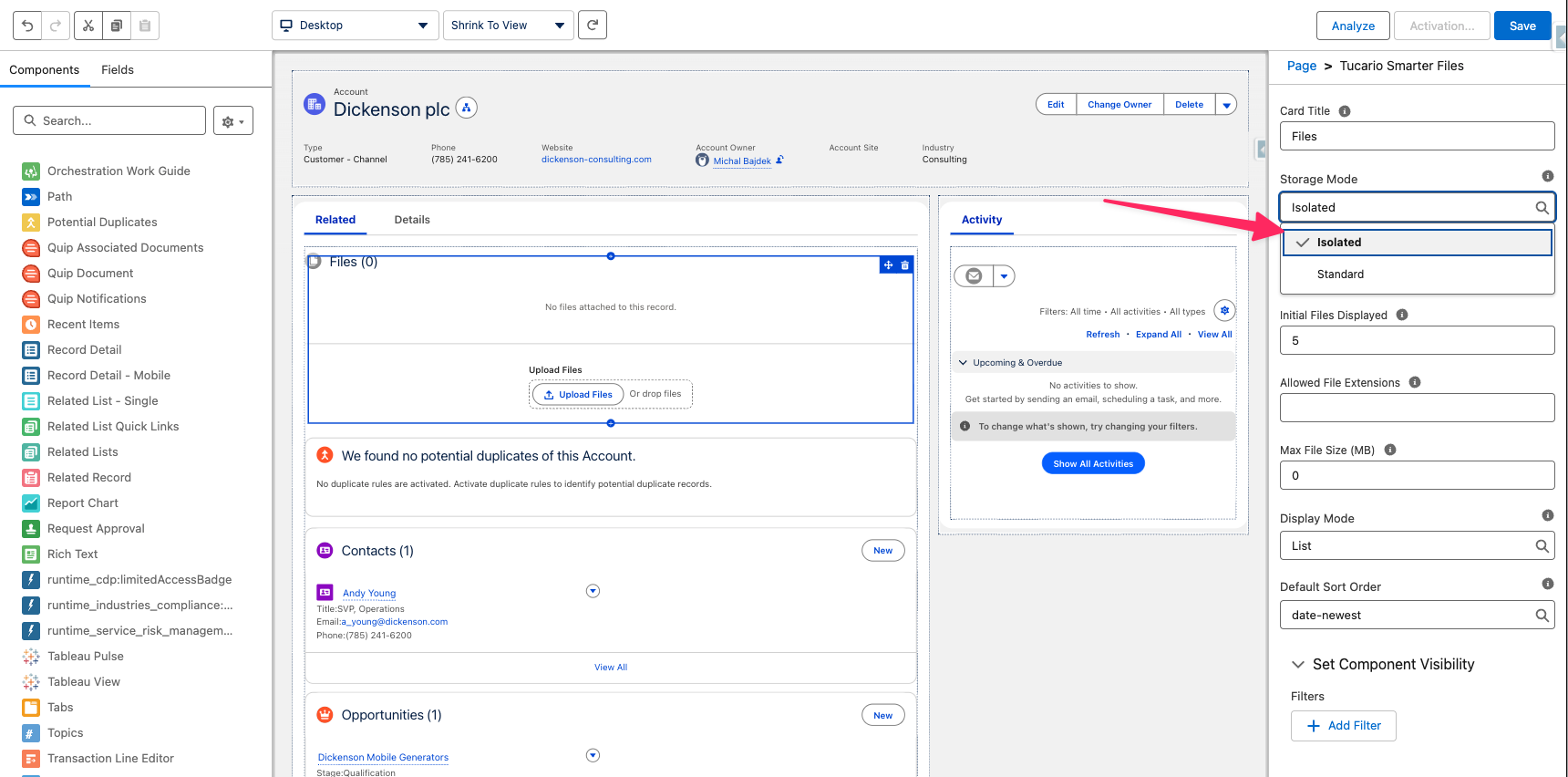
The following properties are available in the Lightning App Builder sidebar:
| Property | Description | Default |
|---|---|---|
| Card Title | Component header text | Files |
| Storage Mode | Standard — files linked via ContentDocumentLink (visible in Files related list). Isolated — files linked via junction record only (hidden from Files related list, enables visibility controls). | Standard |
| Display Mode | How files are displayed: List (vertical rows) or Tiles (grid of cards) | List |
| Default Sort Order | Initial sort order for the file list. Users can change at runtime. Options: date-newest, date-oldest, size-largest, size-smallest, name-az, name-za | date-newest |
| Initial Files Displayed | Maximum number of files shown initially. Set to 0 to show all files. A “Show All” link appears when there are more files. | 5 |
| Allowed File Extensions | Comma-separated whitelist of extensions (e.g., pdf,docx,png). Only these types can be uploaded. Leave empty to allow all types. | All types |
| Excluded File Extensions | Comma-separated blacklist of extensions (e.g., exe,bat,sh). These types are blocked from upload. | None |
| Max File Size (MB) | Maximum file size for uploads in megabytes. Set to 0 for no limit. | 0 (no limit) |
Upload Restriction Logic
Section titled “Upload Restriction Logic”When both Allowed and Excluded file extensions are configured, they work together:
- Allowed list is checked first — if a file’s extension is not on the allowed list, it is blocked.
- Excluded list is checked second — if the file passed the allowed check but its extension is on the excluded list, it is still blocked.
In other words, a file must be on the allowed list and not on the excluded list to be accepted.
Placement Tips
Section titled “Placement Tips”- Works in the main content area, sidebar, or full-width regions.
- Can be placed on any standard or custom object record page.
- Multiple instances on the same page are supported (e.g., different configurations per tab).