
File Actions
Este conteúdo não está disponível em sua língua ainda.
Context Menu Actions
Section titled “Context Menu Actions”Each file in the component has an action menu with the following options:
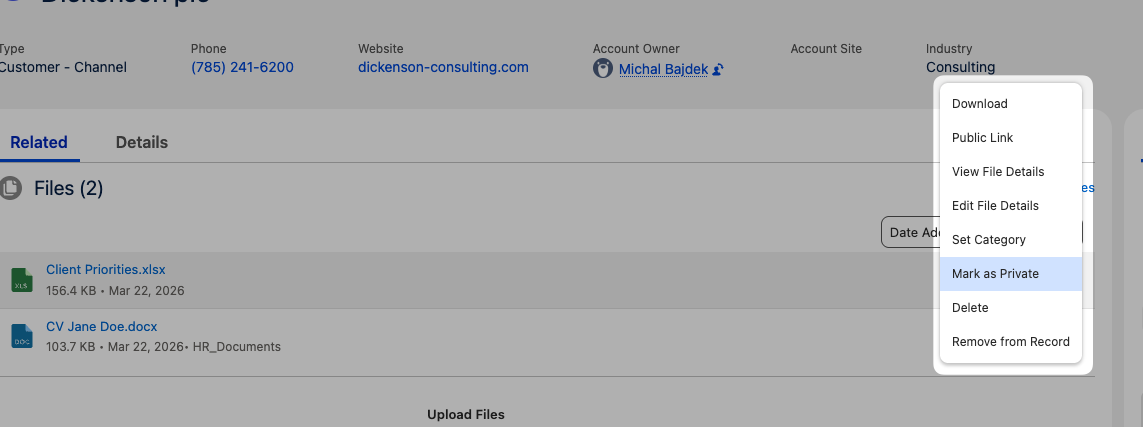
| Action | Description | Availability |
|---|---|---|
| View Details | Opens the standard Salesforce file detail page | All users |
| Edit Details | Edit file name and description inline | Users with edit access |
| Download | Download the individual file | All users |
| Public Link | Generate a public sharing URL for the file | Configurable via component property |
| Delete | Delete the file permanently (with confirmation) | Users with delete access |
| Remove | Remove the file from this record without deleting it | Isolated mode only |
| Set Category | Assign a visibility category to the file | Isolated mode + Manage Categories permission |
| Mark as Private | Make the file visible only to you | Isolated mode only |
| Remove Private | Remove the private flag from the file | Isolated mode, file owner only |
Native File Preview
Section titled “Native File Preview”Clicking a file name opens the standard Salesforce file preview modal — no external viewers or plugins required. The preview supports all file types that Salesforce natively supports (PDFs, images, Office documents, etc.).